
How to Implement a Chatbot for Business Growth
Learn how to implement a chatbot with this practical guide. Discover proven strategies for planning, building, and deploying AI bots that boost engagement.
So, you're ready to get a chatbot up and running on your site. The good news? It's probably easier than you think. Getting started really just boils down to a few key activities: figuring out exactly what you want the bot to do, pulling together your company's knowledge, picking a user-friendly tool like Whisperchat.ai, and then popping it onto your website. Honestly, you can get the whole thing done in less than an hour.
Chatbot Implementation Options at a Glance
Before we jump into the nitty-gritty of using a platform like Whisperchat.ai, it helps to understand the bigger picture. Depending on your team's skills, budget, and how much control you want, you have a few different paths you can take. This table breaks down the most common approaches at a high level.
| Implementation Approach | Best For | Technical Skill Required | Typical Cost |
|---|---|---|---|
| No-Code Platform | Small to medium businesses, quick deployment, marketing/support teams. | None | Low (SaaS subscription) |
| Low-Code Framework | Businesses needing some custom logic but without a full dev team. | Basic scripting/API knowledge | Moderate |
| Custom Build (In-House) | Large enterprises with unique security or integration needs. | Expert (Software engineering, ML) | High (Salaries, infrastructure) |
| Hire an Agency | Companies wanting a custom solution without the in-house expertise. | None (for you) | High (Agency fees) |
As you can see, a no-code platform offers the fastest and most accessible path for most businesses, which is what we'll be focusing on in this guide. It strikes the perfect balance between power and simplicity.
Why a Chatbot Is Your Next Strategic Move

It’s easy to get caught up in the technical side of things, but let's be clear: adding a chatbot is a strategic business decision, not just an IT project. This is about fundamentally improving your customer experience and making your own operations leaner. You're meeting customers on their terms, giving them the instant answers they’ve come to expect, 24/7.
This isn't some fleeting trend. The global AI chatbot market has seen explosive growth, jumping from $2.47 billion in 2021 to an estimated $15.57 billion in 2024. And it's not slowing down-projections point to $46.64 billion by 2029. That kind of rapid adoption tells you one thing: businesses are seeing a massive return on their investment.
The Immediate Business Impact
What does that mean for your business, practically speaking? A chatbot acts as an incredibly efficient first line of defense for your support team. It can instantly handle all the common, repetitive questions that eat up your team's day, freeing them to focus on the complex issues where their expertise really shines. That translates directly to lower operational costs and a much happier, more effective team.
From the visitor's perspective, the value is even more obvious. No more digging through FAQ pages or waiting hours (or days!) for an email response. They get what they need, right when they need it. That seamless experience is often the deciding factor that turns a casual browser into a loyal customer. If you want to dig deeper into that dynamic, exploring some solid conversion optimization tips is a great next step.
More Than Just Answering Questions
A smart chatbot does more than just answer questions; it becomes an active part of your growth engine. By engaging visitors at the right moment, it can:
- Capture leads by asking for contact info.
- Help qualify those leads by asking a few key questions.
- Gather priceless data on what your customers actually want and struggle with.
By thinking of this as a strategic investment from the start, you're setting yourself up for success. The goal isn't just to launch a bot. It's to build a scalable asset that drives real growth and makes your customer service ready for the future.
Laying the Groundwork for a Successful Chatbot

A powerful chatbot isn't about complex code; it's built on a solid strategic foundation. Before you even think about uploading a single document to Whisperchat.ai, you need a crystal-clear vision. This planning phase is what separates a genuinely helpful bot from just another frustrating digital novelty.
The very first thing you have to do is define a single, primary purpose for it. What’s its main job? Is it there to generate and qualify leads for your sales team? Or is it a customer support champion, meant to handle common questions and provide instant help? Maybe it's an internal tool to help your own team find information faster.
Trying to make it a jack-of-all-trades is a classic recipe for failure. A bot built for lead gen will ask entirely different questions than one designed for technical support. Nailing down this core purpose prevents scope creep and makes sure every decision serves a clear, measurable goal.
Defining Your Chatbot’s Core Purpose
A chatbot without a clear job is like an employee without a job description-it’s going to be confused and ineffective. To figure out its function, start by identifying the biggest pain point it can solve for your business or your customers.
Where are the real bottlenecks in your customer journey? Do people frequently abandon their carts? Are your support agents constantly answering the same five questions? Your answers here will point you straight to your chatbot’s primary objective.
Here are a few common roles a chatbot can fill exceptionally well:
- The Support Hero: This bot focuses on resolving customer issues by answering FAQs, checking order statuses, and guiding users through troubleshooting. The goal is to boost customer satisfaction and slash support ticket volume.
- The Lead Magnet: It proactively engages website visitors, answers product questions, and collects contact details to pass along to sales. Here, success is measured by the number of qualified leads it generates.
- The Onboarding Specialist: This bot guides new users through your software, pointing out key features to help them get that first "aha!" moment. It's all about improving user activation and retention.
Once you’ve picked a primary role, stick with it. You can always add more skills later, but starting with a narrow focus is the secret to getting a quick, tangible return.
Mapping the User Journey and Assembling Your Team
With a purpose locked in, you can start mapping out realistic user journeys. Don't just invent problems you think users have. Dive into your actual customer data. Look at support tickets, comb through live chat transcripts, and review sales call notes to understand the real questions people are asking. A great, often overlooked place to find raw, unfiltered feedback is by using various Reddit market research strategies to see what issues people are already discussing.
This research helps you anticipate what users actually need and design conversations that offer genuine solutions. A well-mapped journey ensures your bot doesn't just spit out answers but actively guides users toward a successful outcome.
Don’t try to build this in a silo. A successful chatbot implementation is a team sport, even if your team is just a few people. You need at least three key perspectives: the marketing expert who understands the customer, the support agent who knows the common problems, and the product owner who knows the solution inside and out.
This small, cross-functional team ensures the chatbot’s knowledge is complete, its personality aligns with your brand, and its goals support the bigger business picture. Getting everyone on the same page from the start is absolutely essential for a smooth rollout and long-term success.
Alright, let's move from theory to action. This is where all that planning pays off and you get to build your very first AI chatbot with Whisperchat.ai. We're about to turn your strategic ideas into a real, working assistant that can start helping your customers right away.
The best part? You don't need to be a developer. Forget about tangled APIs or lines of code. Modern platforms like this are built for business users, meaning you can bring a chatbot to life simply by giving it the right information. This is the first hands-on step toward creating a powerful new asset for your business.
Giving Your Chatbot a Brain
Think of your new chatbot as an eager-to-learn employee on their first day. It starts as a blank slate, and its intelligence comes directly from the knowledge you feed it. This is easily the most important part of the setup-the quality of your data directly shapes the quality of its answers. A bot trained on fuzzy, incomplete info will only give vague, unhelpful responses.
Whisperchat.ai makes this data-feeding process incredibly straightforward. You have a few options:
- Website Crawling: Just pop in your website’s URL. The platform will automatically scan and learn from your existing content-product pages, your "About Us" section, FAQs, you name it.
- Document Uploads: Have internal guides, detailed product manuals, or support scripts tucked away? You can upload files like PDFs, Word docs, and text files directly.
- Pasting Text: For those one-off bits of information or quick updates, you can simply copy and paste text right into the knowledge base.
For example, an e-commerce shop might upload its product catalog as a CSV, its return policy as a PDF, and then crawl its blog for articles on product care. By combining these sources, you create a well-rounded expert that can handle a huge variety of customer questions. Building an AI chatbot really hinges on having a solid underlying data infrastructure for AI to ensure all this information is processed efficiently and performs when it matters.
A Practical Walkthrough with Whisperchat.ai
Let's get practical. Imagine we're building a support bot for a small SaaS company. Our main goal is to field common "how-to" questions and point users toward our tutorials.
First, we sign up for Whisperchat.ai and create a new chatbot. Once in the dashboard, we head over to the "Data Sources" section. The first thing we'll do is paste the URL to our main "Help Center." The platform immediately gets to work, crawling those pages and learning from our guides and articles.
Next, we have a couple of important setup documents saved as PDFs that aren't on our public website. We'll click "Upload Files" and add our "Getting Started Guide.pdf" and "Billing Guide.pdf." Within minutes, the chatbot has digested this information, effectively "reading" and understanding it. It’s like creating a second brain for your business, one that’s been trained on your specific expertise.
If you want an even more detailed walkthrough, our guide on how to build your own chatbot breaks this down even further.
This whole process can be visualized as a simple, three-step model for designing the bot's conversations.
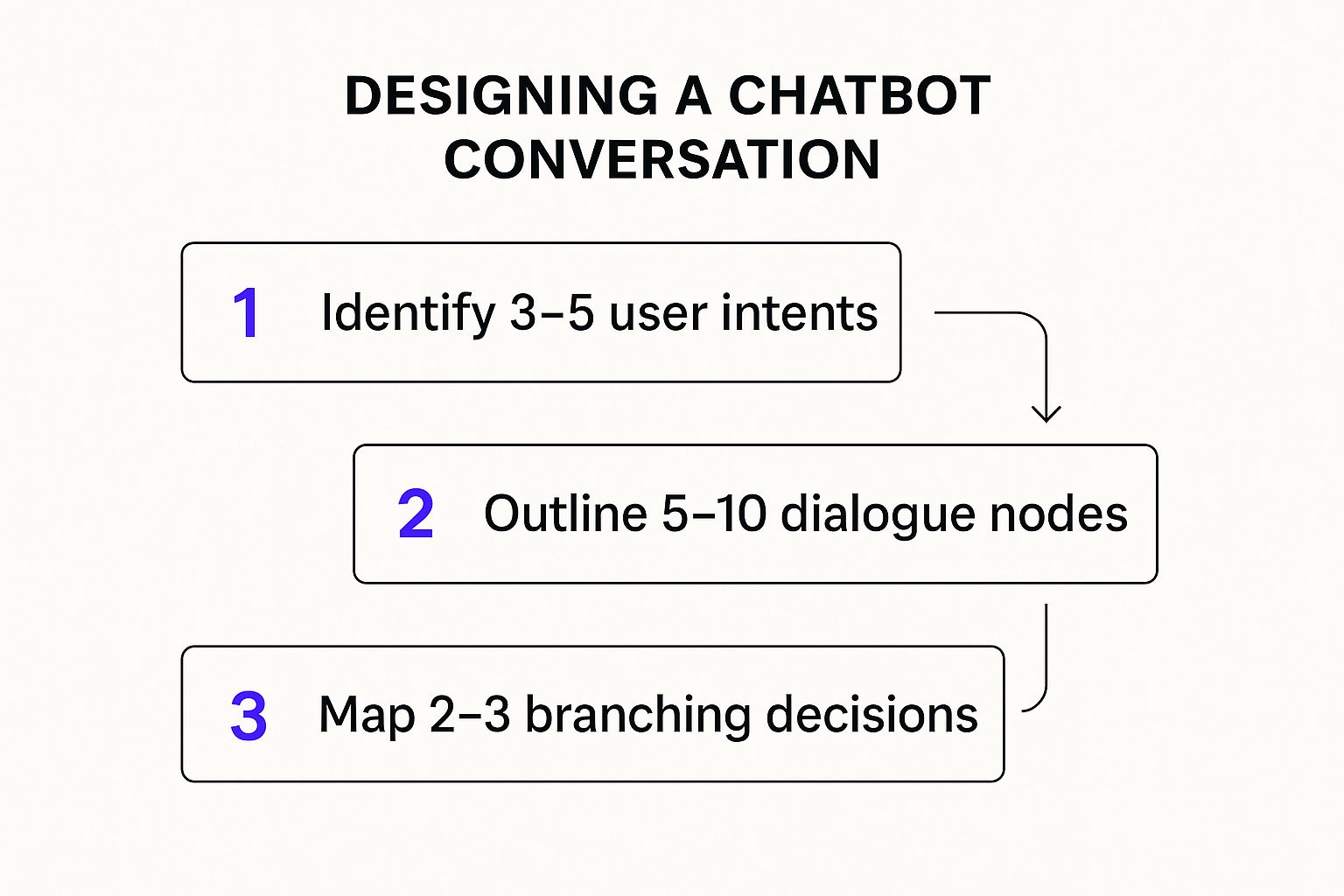
As the graphic shows, a great chatbot experience starts with understanding what the user wants (their intent), then structuring the conversation (the flow), and finally, planning for the different paths a user might take (branching).
First-Time Setup and Customization
With the knowledge base loaded, it's time to customize the bot's personality and appearance. This is a small step that makes a huge difference in making the chatbot feel like a natural part of your brand, not some clunky, third-party add-on.
Inside the "Settings" tab, you can quickly tweak a few key things:
- Welcome Message: This is your first impression. Ditch the generic "How can I help you?" for something more on-brand and helpful, like, "Welcome! Ask me anything about setting up your account or finding features."
- Suggested Questions: Give users a gentle nudge in the right direction. Adding a few prompts like "How do I add a team member?" or "Where can I find my invoice?" shows them what the bot is capable of.
- Color Scheme and Avatar: Match the chatbot's colors to your website's branding and upload your company logo. This visual consistency builds trust.
Paying attention to these details is what encourages people to actually use the bot. When it looks and feels like it belongs, users are far more likely to engage with it.
Key Takeaway: A well-implemented chatbot does more than just answer questions; it drives serious business value. Projections show that by 2025, chatbots will save businesses roughly $11 billion annually and cut down on labor by nearly 2.5 billion work hours. This incredible efficiency comes from bots handling about 80% of routine customer queries, freeing up human agents to tackle the more complex issues that require a human touch.
By following these steps, you’ve successfully moved from a plan on a whiteboard to a real, data-driven chatbot. It's trained on your unique business knowledge, customized to match your brand, and ready to be embedded on your site to start helping customers. It really shows how accessible this technology has become.
Refining Your Chatbot's Personality and Voice
A chatbot that just works is fine. But a chatbot with a distinct personality? That’s where the magic happens. Any out-of-the-box bot can spit out answers, but a carefully crafted one builds a real connection and becomes a seamless extension of your brand. This part of the process is all about turning your AI from a generic tool into a genuine brand ambassador.
Think about it-the personality you bake into your chatbot directly shapes how people see your company. If you're a financial services firm, you'll probably want a bot that sounds professional, precise, and reassuring. But if you're a DTC brand selling quirky socks, you'd likely aim for something witty, fun, and casual. Neither is right or wrong; it's all about what feels authentic to your brand.
Nailing this down is what separates a good implementation from a great one. It's about creating an experience that’s consistent with every other touchpoint a customer has with you, from your website copy to your social media voice.
Crafting Your Base Prompt
The heart and soul of your chatbot’s personality is its base prompt, sometimes called system instructions. I like to think of it as the bot's core directive-a set of rules and a persona description it constantly refers to before answering any question. It's the little voice in its head guiding every single response.
Getting this prompt right almost always involves some trial and error. You'll probably start with a simple instruction, test it out, and then refine it based on the bot's answers. I remember one developer who built a bot for his personal blog; he had to get surprisingly forceful with his prompt to make the bot prioritize its knowledge base instead of just making up answers.
Your first draft doesn't need to be perfect, but it should definitely cover three key areas:
- Role: Who is the chatbot? For example, "You are a friendly and helpful support expert for XYZ Company."
- Tone: How should it talk? Something like, "Respond in a casual, encouraging, and clear tone. Use emojis where appropriate but avoid slang."
- Boundaries: What should it never do? This is critical. For instance, "Do not answer questions outside of our product offerings. Never guess an answer; if you don't know, offer to connect the user to a human agent."
This simple framework gives you the essential guardrails to keep your bot helpful and perfectly on-brand.
Creating a Simple Persona Document
To keep everyone on the same page, especially when you have multiple team members touching the chatbot, creating a simple persona document is a game-changer. This doesn't need to be some elaborate, multi-page branding exercise. Honestly, a one-page guide is usually more than enough.
| Persona Element | Example for a B2B SaaS Company | Example for an E-commerce Store |
|---|---|---|
| Name | "AssistBot" | "Leo the Lion" |
| Core Trait | Professional & Efficient | Friendly & Enthusiastic |
| Greeting Style | "Hello. How can I assist you with our platform today?" | "Hey there! What awesome product can I help you find?" |
| Key Vocabulary | "Integrate," "Optimize," "Solution," "Platform" | "Awesome," "Cool," "Check it out," "Perfect for" |
| Emoji Use | Minimal and professional (e.g., ✅, 📈) | Frequent and expressive (e.g., ✨, 😎, 🚀) |
| Escalation Phrase | "That's a great question. Let me connect you with a specialist who can provide more detail." | "I'm not quite sure! Let me get one of my human friends to jump in and help you out." |
This simple table becomes your single source of truth for the bot's voice. It’s incredibly useful when you need to update the base prompt or train new team members, giving everyone a clear reference point.
Pro Tip: Test your prompts relentlessly. Throw a whole range of questions at your chatbot-simple stuff, complex scenarios, even ambiguous or off-topic queries. See how it reacts. Does it stick to the persona? If it goes off-script, go back and tweak your base prompt to be more specific. For instance, if you find it's getting too wordy, add a directive like, "Keep your answers concise and under three sentences."
Setting Guardrails for User Trust
Finally, let's talk about guardrails. This part is non-negotiable if you want to build trust with your users. A chatbot that confidently gives wrong information is so much more damaging than one that knows its limits and admits it.
Your instructions need to be explicit about how the bot handles questions it can't answer from its knowledge base. The best approach is always a graceful handoff. Tell the bot to say something like, "I don't have the answer to that, but I can connect you with our support team who can help." This kind of transparency prevents frustration and shows the user you have their back.
You should also define the scope of its knowledge. If it's a support bot for your software, instruct it to politely decline questions about the weather or stock prices. This keeps the conversation focused and reinforces the bot's purpose. It’s these small, thoughtful details that truly make an implementation a success.
Getting Your Chatbot Live On Your Website
You've built a smart chatbot with a distinct personality. Now for the fun part: setting it loose on your website so it can start helping visitors. This is the moment all your work pays off, turning your AI into a real, interactive tool. Thankfully, platforms like Whisperchat.ai have made this last step pretty painless, so you won't need to be a coding wizard to get it done.
It really just comes down to copying a small snippet of code from your dashboard and pasting it into your website’s HTML. A quick copy-paste is all it takes to bring your AI assistant to life, ready to greet every person who lands on your site.
How Should Your Chatbot Appear?
Before you jump in, you have a small but important decision to make: do you want the chatbot floating in the corner or embedded directly on a page? Each approach offers a different feel, so let's break them down.
Floating Widget: This is the classic chat bubble you see everywhere, usually hanging out in the bottom-right corner of the screen. It's visible and easy to access without getting in the way. For most businesses, this is the go-to option for support and lead generation because it’s always there, just one click away.
Inline Embed: This option places the chatbot right inside the content of a page, like a dedicated support or contact page. It feels more like a built-in feature of the page itself. This is a great choice if you're building a specific help center or want to contain the chat experience to one spot.
Honestly, for most use cases, I’d recommend starting with the floating widget. Its constant visibility gives you the best shot at engaging users, which is exactly what you want for high-resolution rates and effective automating customer support.
Grabbing and Placing the Code
Once you've picked a style, getting the code from Whisperchat.ai is a breeze. Just head over to the "Embed" or "Publish" section in your chatbot's settings. You'll see a pre-made JavaScript snippet waiting for you.
Click the "Copy" button-that’s it. Now, you just need to paste this code into your website's HTML, right before the closing </body> tag. Placing it here allows all your page content to load first, so your site feels fast and responsive to visitors.
Pro Tip: If you're on a platform like WordPress, look for a plugin or a "Custom Scripts" section in your theme options to paste the code. For Shopify users, you'll likely edit your main theme file (usually
theme.liquid). The goal is to make this a simple, one-time setup.
A Quick Look at Global Chatbot Trends
It’s interesting to see how chatbots are being used around the world, as it can offer some perspective for your own strategy. For example, look at the Asia-Pacific (APAC) market. Messaging apps are king there, so it’s no surprise that a staggering 85% of global chatbot spending in 2023 happened in that region, even though it only accounts for 53% of the world's population.
This isn't just a random stat. As this deep dive on chatbot statistics shows, it proves a simple but powerful point: you have to meet your customers where they are.
By embedding your chatbot right on your website-your digital storefront-you're tapping into a proven global strategy. With the code now in place, your new AI team member is officially on the clock, ready to help visitors 24/7.
Common Questions About Chatbot Implementation
Even with a straightforward setup, a few questions always come up as you get ready to launch and manage your new chatbot. Let's tackle some of the most common ones I hear from businesses just like yours. This should help clear up any lingering uncertainties and give you the confidence that you're heading in the right direction.
Think of this as the final check-in before you go live, covering the practical stuff-cost, time, and how to know if it's actually working.
How Much Does It Cost to Implement a Chatbot?
This is usually the first question out of everyone's mouth, and for good reason. The honest answer is: it varies wildly. A chatbot can cost anything from a small monthly fee to a massive six-figure project.
For most businesses, a no-code platform is the smartest and most affordable path. A service like Whisperchat.ai usually runs on a monthly subscription, often starting under $100. This gets you incredibly powerful AI without the headache or cost of hiring a development team.
On the other extreme, you have fully custom-built AI assistants. These can run anywhere from $5,000 to over $500,000. That kind of investment is typically reserved for large enterprises with unique security protocols or complex, legacy system integrations. For almost everyone else, a ready-made platform gives you the best bang for your buck.
How Long Does Implementation Take?
With a modern tool, you can have a working chatbot on your website in less than an hour. I'm not kidding. The technical part is a breeze: sign up, point it to your website or upload your documents, pick your brand colors, and copy a single line of code.
The real time investment isn't the technical setup-it's preparing your data. The effort you put into organizing your help docs, product specs, and FAQs beforehand is what determines the quality of your chatbot's responses.
What Are the Biggest Mistakes to Avoid?
Knowing how to implement a chatbot is as much about knowing what not to do. I’ve seen a few common missteps that can easily be avoided with a little foresight.
- Lacking a Clear Purpose: A bot that does a little bit of everything will ultimately fail at all of it. Decide its primary job. Is it for customer support? Lead qualification? Stick to one main goal to start.
- Using Bad Training Data: The old saying "garbage in, garbage out" has never been more true. If you feed the bot incomplete or inaccurate information, it will give users wrong answers and create frustration.
- Forgetting a Personality: A dry, robotic chatbot is instantly forgettable. Give it a voice that reflects your brand. This small touch makes the conversation feel more human and builds trust.
- Hiding the Human Escape Hatch: Sometimes, a user just needs to talk to a person. Making it hard to reach your team is a recipe for a terrible customer experience. Always provide a clear path to human support.
How Do I Measure Chatbot Success?
You can't fix what you don't measure. To really understand your chatbot's value, you need to track a few key performance indicators (KPIs). Most platforms, including Whisperchat.ai, have a built-in analytics dashboard that makes this easy.
Here’s what I recommend focusing on:
- Resolution Rate: What percentage of chats does the bot handle successfully on its own, without needing a human to step in?
- User Satisfaction (CSAT): Are people actually finding it helpful? A simple thumbs-up/thumbs-down poll after an answer can tell you a lot.
- Engagement Rate: Of all your website visitors, how many are actually starting a conversation with the bot?
- Lead Generation: If you're using it for sales, how many qualified leads is it actually capturing? We dive deeper into this in our guide on using a chatbot for lead generation.
Keeping an eye on these numbers will show you exactly where to make improvements and prove the chatbot’s ROI to your team.
Ready to put these answers into action? Whisperchat.ai makes it simple to build and deploy a smart AI assistant trained on your own data. Start your free trial and get your chatbot live in minutes.