
Customer Service Knowledge Management Tips to Enhance Support
Learn essential customer service knowledge management strategies to improve support teams and boost customer satisfaction effectively.
Understanding Customer Service Knowledge Management

Imagine your support team having a shared, external brain. That’s the core idea behind customer service knowledge management. It's a system built to capture, organize, and instantly share every solution, customer insight, and hard-won lesson your team gathers over time. This isn't just a digital filing cabinet gathering dust; it's a dynamic tool that makes your team smarter and more effective.
The difference is clear: an agent frantically searching for an answer versus an agent who confidently provides one in seconds. Too often, this process is mistaken for a simple documentation project. Its real value comes from turning scattered bits of information-like notes in a document, a conversation in a messaging app, or an expert agent's memory-into a reliable resource that powers better customer experiences. This system becomes the single source of truth, ensuring every customer gets a consistent and accurate answer, no matter if they interact with a chatbot, a self-service portal, or a live agent.
From Information Hoarding to Collective Intelligence
The main purpose of customer service knowledge management is to tear down information silos. In many companies, critical information gets trapped with specific individuals, creating what’s known as “tribal knowledge.” This makes your organization vulnerable if a key employee leaves and creates frustrating delays for new agents and customers alike.
A formal system puts this collective intelligence in everyone’s hands. To build a foundation for great support, it helps to adopt established help desk best practices that focus on structure and easy access. An effective system typically includes:
- A Centralized Knowledge Base: One searchable place for all support-related content.
- Clear Content Governance: A defined process for creating, reviewing, updating, and removing information to keep it trustworthy.
- Seamless Integration: The ability for your knowledge base to connect with other tools like your CRM and ticketing system.
Why It’s a Growing Business Imperative
This focus on organized knowledge isn’t just a passing trend; it reflects a major shift in how businesses operate. The global knowledge management market is projected to swell to $2.1 trillion by 2030, a huge increase from its current value. This growth shows a widespread understanding of its vital role in improving efficiency and delivering better service.
Investing in a structured system gives your team the tools they need to succeed, builds customer loyalty, and, most importantly, protects your company's most valuable asset: its collective wisdom. You can discover more about the market's expansion and its driving factors to see why this is becoming non-negotiable. This is the foundation that separates merely good support from truly great support.
The Hidden Costs of Knowledge Management Failures
When a customer service knowledge management system isn't working, the damage goes far beyond longer hold times. The consequences are expensive, creating a chain reaction that harms your team, your customers, and your bottom line. These failures show up in subtle yet damaging ways, chipping away at the foundation of great service.
The Agent Burnout Cascade
Imagine a support agent constantly trying to solve the same problem over and over. This isn't just inefficient; it's a fast track to agent burnout. When important company knowledge isn't captured and shared, every agent is forced to start from scratch, every single time. This creates several problems:
- Reinventing the Wheel: Agents waste valuable time solving issues that their colleagues have already figured out.
- Knowledge Hoarding: Without a central place for information, expertise stays with a few senior agents, creating dependencies and slowing everyone down.
- Employee Turnover: Frustrated agents eventually leave, taking their hard-won knowledge with them and forcing the cycle to repeat with every new hire.
This constant struggle to find information creates a high-stress environment that directly hurts team morale and performance. The problem often gets worse when different departments don't share information, leading to customers being bounced around for a single issue.
The Customer Frustration Tax
From the customer's point of view, these internal issues feel like inconsistent and unreliable service. In a world where quick answers are expected, even small delays or conflicting information can seem like major failures. This isn't just a minor annoyance; it has real financial consequences.
Research shows that 73% of consumers will switch to a competitor after having multiple bad service experiences. The connection between service quality and revenue is clear. In fact, about three-quarters of consumers are willing to spend more with companies that provide a better experience. You can read more about these customer service trends to see the direct financial impact.
Poor customer service knowledge management doesn't just cost you time; it costs you trust, talent, and customers. It’s like a hidden tax on your business that grows with every unanswered question and every frustrating interaction. Fixing these core problems isn't just about being more efficient-it's essential for survival and growth.
Building Knowledge Systems That Actually Get Used
The most impressive customer service knowledge management system is worthless if agents don't use it. The difference between a system that becomes the team’s lifeline and one that gathers digital dust is adoption. This isn't achieved through mandates but by designing a system that feels like a natural extension of an agent's workflow, making their job genuinely easier.
A system that gets used is intuitive. Think of it like a GPS that suggests a faster route before you even realize you're stuck in traffic. An effective knowledge base should surface relevant articles and solutions proactively as an agent types a ticket summary or chats with a customer. It anticipates needs rather than waiting for a specific, perfectly phrased query. When agents trust that the system will provide answers faster than they could find them on their own, it becomes an indispensable tool.
Designing for Trust and Usability
For a knowledge system to become second nature, it must be built on two pillars: effortless content creation and reliable information. If updating an article is a bureaucratic chore, the content will quickly become stale. A key part of building knowledge systems that actually get used is making content creation and management simple. A smooth workflow, supported by strong editor capabilities in a knowledge system, allows subject matter experts to add or revise information without friction.
This leads to the second pillar: content governance. This isn't about rigid control but about smart processes that ensure accuracy. A simple feedback loop, where agents can flag outdated or unclear articles directly from the content they are viewing, is essential. This creates a self-correcting system where frontline user interactions constantly refine the quality of the knowledge base. This process ensures that agents trust what they find, which is the bedrock of adoption.
Measuring What Drives Success
To ensure your knowledge management strategy is working, you need to track metrics that reflect both efficiency and adoption. The infographic below shows key metrics that successful teams monitor.
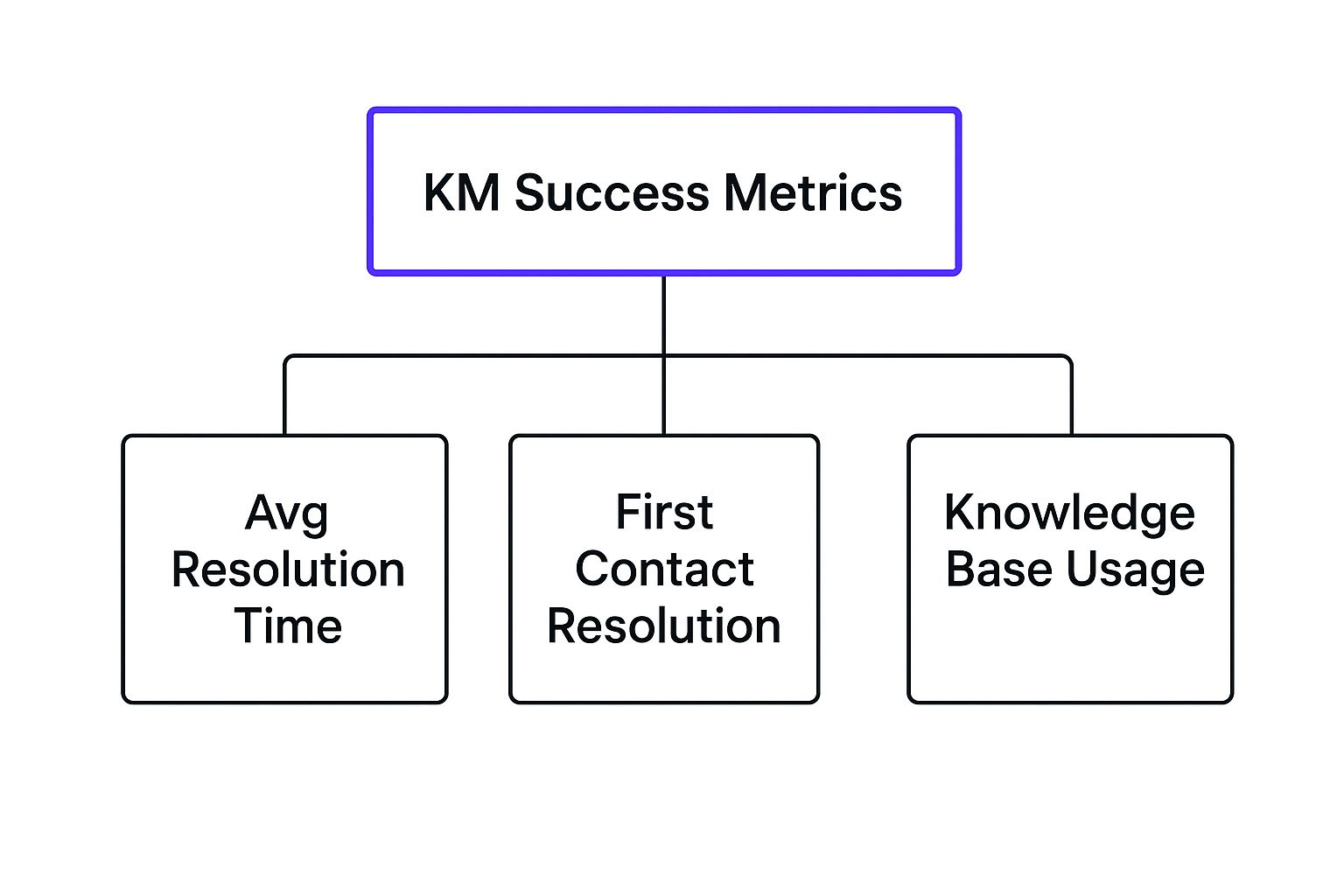
This diagram shows that success isn't just about speed; it’s about resolution quality and how deeply the knowledge base is integrated into daily operations. When Knowledge Base Usage goes up, it should positively impact both First Contact Resolution and Average Resolution Time, proving the system is delivering real value.
Creating Knowledge-Driven Support Workflows

The best support teams don't just have a great library of information; they build their entire operation around it. True customer service knowledge management is about weaving knowledge capture directly into the daily fabric of an agent's work, making it a natural part of solving customer issues. This changes support from a reactive, problem-solving function into a proactive, solution-delivering engine.
The idea is to structure workflows so that every single interaction becomes a chance to build the team's shared brainpower. Instead of treating documentation as a chore to be done later, top-performing teams find key moments in the support process to embed knowledge creation. This method, often part of an approach called Knowledge-Centered Service (KCS), is all about capturing knowledge at the moment of need.
The KCS Approach in Action
Let's walk through what this looks like. Imagine a support agent gets a ticket for a technical problem they've never seen before. A knowledge-driven workflow guides them through a clear process:
- Search First: Before doing anything else, the agent checks the knowledge base. Does a solution already exist? This simple step prevents teams from solving the same problem over and over again.
- Solve and Document: As the agent works through the issue, they create a draft article detailing the steps they took. The context is fresh in their mind, which makes the documentation more accurate and useful.
- Instant Peer Review: The draft is then flagged for a quick check by a subject matter expert or a peer. This ensures quality control without creating a long, bureaucratic approval process.
- Publish and Reuse: Once approved, the article goes live immediately, ready for the next agent who encounters the same problem.
This cycle turns everyday problem-solving into a system that constantly improves the knowledge base. It also directly tackles a major challenge in support. A staggering 80% of customer support agents say that better access to information from other departments would make their jobs much easier. You can learn more about how professionals lose time searching for information to see the real cost of inefficient knowledge sharing.
Embedding knowledge into workflows also gives agents a greater sense of ownership and improves their job satisfaction. They are no longer just closing tickets; they become active builders of a system that helps everyone on the team win. This well-structured knowledge also lays the groundwork for tools that can automate customer support, powering chatbots and self-service options that provide instant answers and free up agents to handle more complex issues.
Choosing Technology That Fits Your Team

Picking the right platform for your customer service knowledge management is a bit like choosing a vehicle for a road trip. A small car might be perfect for a quick city drive, but you'll need something much larger and more robust for a cross-country journey with the whole family. In the same way, a simple documentation tool might work for a small team, while a large, distributed workforce needs a powerful knowledge ecosystem. The goal is to match the technology to your team's specific journey, not just the marketing hype.
It's easy to get sidetracked by a long list of advanced features you may never actually use. Instead, your focus should be on the core functions that solve your team's biggest problems. Research reveals that 44% of customer service departments still don't use knowledge management, often because they see the technology as too complex. This really drives home the need to start with a system that puts usability and easy access first.
Key Factors for Your Decision
When you're looking at different options, you need to go beyond the sales pitch and ask practical questions. For example, how well does the platform connect with the tools you already have, like your CRM or ticketing system? A system that doesn’t integrate well can create the very information silos you’re trying to get rid of.
Consider these critical factors:
- Ease of Use: Can your agents find what they need in just a few clicks? Is the content editor straightforward enough for subject matter experts who aren't tech gurus?
- Search Capability: Does the tool have a smart, AI-assisted search that understands natural language and can find the right articles even with typos?
- Integration Power: Will it connect smoothly with the software your team uses every single day? This is essential for a unified and efficient agent experience.
- Scalability: Can the platform expand as your team grows? A system that works for five agents should be able to support fifty without needing a major, disruptive overhaul.
Comparing Platform Types
To help you choose the right tool, it's helpful to see how different types of platforms stack up against each other. The table below compares popular knowledge management solutions, offering a look at who they're best for, their main features, typical pricing, and how well they integrate with other tools.
| Platform Type | Best For | Key Features | Pricing Range | Integration Capabilities |
|---|---|---|---|---|
| Simple Document Repositories | Small teams, internal-only knowledge. | Basic text editing, folder organization, simple search. | Free to low-cost monthly plans. | Limited; may offer basic file-sharing links. |
| Integrated Knowledge Bases | Growing support teams needing structure. | Rich text editor, version control, ticketing system integration (Zendesk, Help Scout). | Mid-tier; often priced per agent per month. | Strong; built to connect with CRMs and help desks. |
| AI-Powered Ecosystems | Large enterprises, multi-channel support. | Generative answering, proactive content suggestions, unified analytics. | Enterprise-level; custom pricing based on usage. | Extensive; connects to virtually all business systems via APIs. |
This comparison shows there's no single "best" platform-only the one that's best for you. A small team doesn't need to pay for an enterprise-level system, and a large organization will quickly outgrow a simple document folder.
Ultimately, the best technology is the one your team will actually use. When you focus on practical needs over flashy but unnecessary features, you ensure your investment genuinely improves performance instead of just adding another rarely-used icon to your agents’ desktops.
Harnessing AI Without Losing the Human Touch
Artificial intelligence is changing the game in customer service, but its real value comes from supporting human expertise, not replacing it. Think of AI as a brilliant research assistant for your support team-one that can instantly sort through mountains of data to find the exact answer needed. The best systems don't push your agents aside; they empower them, turning a static knowledge base into an intelligent partner that helps solve problems on the fly. This approach is key to improving customer service knowledge management.
Forward-thinking teams are using AI to suggest relevant help articles during a live chat, recommend solutions based on similar past tickets, and even help agents write clearer documentation. This is where AI moves beyond simple automation and becomes a collaborative tool, making every agent more capable and confident.
Making Information Conversational
One of the most useful applications of AI is its ability to understand natural language processing (NLP). This technology lets agents and customers search for information just like they'd ask a colleague for help, instead of trying to guess the right keywords. For instance, rather than typing “error code 404 setup,” a user could ask, “What should I do when I get an installation error?” The AI can understand the intent behind the question and deliver the correct solution.
This conversational style makes finding information quicker and more intuitive. AI-powered systems also use machine learning to get smarter over time. They learn which solutions work best and can even spot gaps in your knowledge base that need to be filled. This continuous learning cycle ensures your support information is always getting better. Understanding the difference between a chatbot vs live chat can help you see how this technology fits into a wider support plan.
Balancing Automation with Empathy
Despite its clear advantages, putting AI into practice can be tricky. Poor customer service still costs U.S. companies an estimated $75 billion every year, often because of a disconnect between what the technology can do and how it's actually used. While many businesses are adopting AI, only about 25% of call centers have successfully woven it into their day-to-day work. You can explore a deeper analysis of these customer service statistics to understand their full impact.
The most successful AI integrations happen gradually, giving teams time to build confidence and skill. The goal should be to automate the repetitive, simple tasks. This frees up your agents to focus on the complex issues that require genuine empathy and creative problem-solving-the human touch that technology can't replicate. This balanced strategy keeps the personal connection customers appreciate while making your support operations much more efficient.
Measuring What Matters and Getting Better
An effective customer service knowledge management program isn’t a one-and-done project. Think of it as a living system, like a garden, that needs regular attention to flourish. To guide its growth, you need to track the right metrics-not for the sake of collecting data, but to gain real insight into what’s working and what needs tending to.
It’s like a doctor monitoring a patient's vital signs. Metrics such as First Contact Resolution (FCR) and Average Handle Time (AHT) are certainly important, but they don’t paint the whole picture. Top-performing teams go deeper, measuring the health of the knowledge base itself and how it directly affects both agent performance and customer happiness.
Key Metrics for a Healthy Knowledge System
To get a complete view, you need a balanced set of metrics that cover efficiency, quality, and how well the system is being used. Here are a few essential indicators to keep an eye on:
- Content Usage: Which articles are agents turning to most often? This reveals the most valuable information in your arsenal and tells you where to focus your documentation efforts.
- Knowledge Contribution Rates: How many new articles are your team members creating or updating? This shows how deeply the culture of knowledge sharing has taken root.
- Customer Self-Service Success: What percentage of customers find what they need on their own, without ever contacting an agent? This is a direct measure of your public-facing knowledge base's effectiveness.
- Agent Feedback Scores: What ratings are agents giving the articles they use? A simple thumbs-up or thumbs-down feature can quickly flag content that’s unclear, incorrect, or out of date.
Tracking these indicators alongside traditional support metrics gives you a much richer understanding. For a more detailed look, our guide on key customer support metrics offers more ideas for building a solid analytics framework.
Identifying and Closing Content Gaps
One of the greatest challenges is discovering what’s missing from your knowledge base before it becomes a customer’s problem. The data below shows just how critical fast and effortless service is for today's consumers.
This chart makes one thing clear: valuing a customer's time is non-negotiable. Every second a customer or agent spends searching for an answer that doesn't exist chips away at trust and efficiency. Identifying these content gaps proactively is essential. Start by analyzing search queries that yield zero results and reviewing support tickets where agents couldn’t find a relevant article. These are clear signposts pointing directly to the new content you need to create.
By building a system of measurement focused on continuous improvement, you turn your knowledge management from a simple library into a strategic asset that gets smarter with every interaction.
Ready to see how an AI-powered chatbot can put your knowledge base to work providing instant, 24/7 support? Discover how Whisperchat.ai can help you answer customer questions automatically, freeing up your team for more complex issues.